

CodeceptJS 4 is out
CodeceptJS 4 is out, and this is the big one. We sat on the 3.x line for a long time. In those years the way tests get written changed under our feet. More and more test-automation code is written by agents now. Fewer people type it by hand. We rebuilt CodeceptJS around that. An agent can write and fix tests by driving a live browser. It does not guess from a screenshot after the fact.
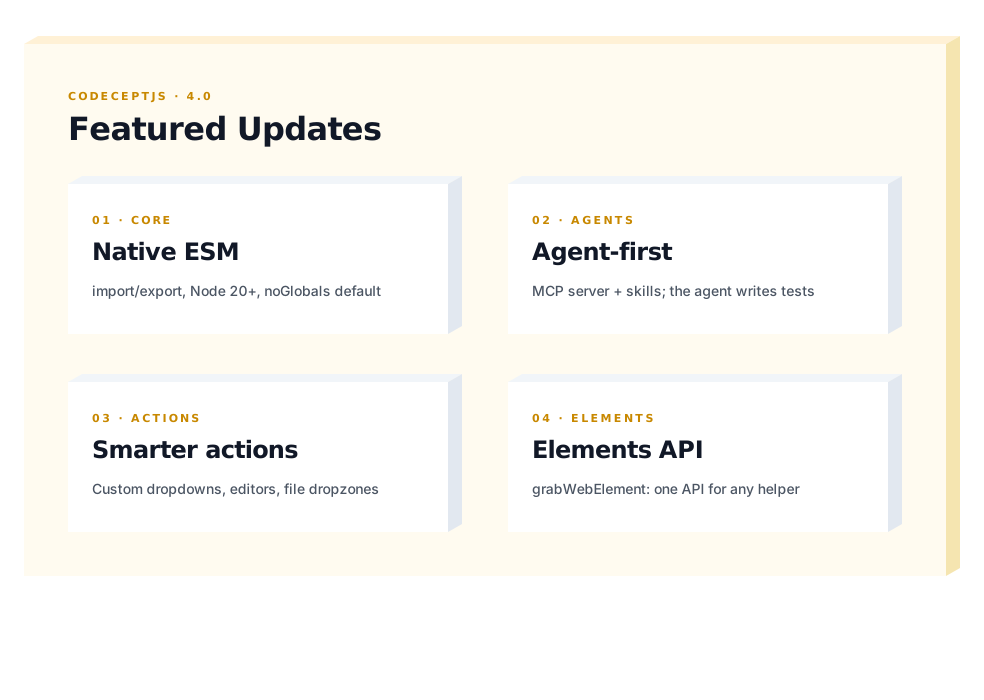
There is more in the box: native ESM, smarter basic actions, a helper-agnostic element API, and a reworked plugin. Let’s go through the big things first. Then the breaking changes you should know about before you upgrade.
Native ESM
Section titled “Native ESM”CodeceptJS 4 ships as native ESM. Your project needs "type": "module" and NodeJS 20 or Bun. If you use TypeScript, tsx replaces ts-node/esm. The old loader still runs but warns.
This was a long-overdue task. Doing it by hand would have taken weeks of boring work. Luckily the migration started in August 2025 with an agent already capable of the job. Moving everything to modern ESM syntax opened the door to more innovation.
Helpers, page objects, and config go from require/module.exports to import/export:
// 3.xconst Helper = require('@codeceptjs/helper')class MyHelper extends Helper {}module.exports = MyHelper
// 4.ximport Helper from '@codeceptjs/helper'class MyHelper extends Helper {}export default MyHelper
The other change is globals. noGlobals: true is what npx codeceptjs init writes into new configs, and it is the direction we want everyone to move. The symbols that used to be global become imports:
import { within, session, secret, locate, actor } from 'codeceptjs'import { tryTo, retryTo, hopeThat } from 'codeceptjs/effects'import Helper from '@codeceptjs/helper'Existing 3.x test files keep working until you flip the flag. Every run without it prints a deprecation warning. This is table stakes for the rest of the release, so we kept the migration mechanical.
Built for agents
Section titled “Built for agents”We think the coding part of test automation now belongs to the agent. Our job is to hand that agent the most effective tool we can. With it, the agent writes a working test without stopping to ask you halfway through. Everything in this section exists to make that loop tight.
npx codeceptjs-mcp starts an in-process Model Context Protocol server. In-process matters. The agent, the test runner, and the browser share one container and one browser session, with no subprocess and no IPC. Through it an agent can:
list_testsandlist_actionsrun_code, arbitrary JS with the fullI.*scoperun_testwith a programmaticpauseAtbreakpointrun_step_by_stepsnapshotthe page at any momentcontinueorcancela paused run without closing the browser
The working loop starts from a stub the agent can stop inside:
Scenario('checkout', async ({ I }) => { I.amOnPage('/cart') pause() // agent drives the live browser from here, then writes verified steps above})It opens the page, reads it, runs I.* commands live against the real DOM, verifies each one worked, and commits the verified sequence back into the test file in place of the stub. The agent tries each selector on the real page and keeps the ones that hit.
That loop stays cheap because of how data moves. CodeceptJS writes HTML, ARIA trees, console logs, and HTTP records to files on disk. The agent reads them with its own shell tools. It can grep through a large page.html, jq into console.json, or open a screenshot as an image. Nothing gets streamed back through MCP as context on every step. Unlike accessibility-tree-only browser MCPs, the agent sees the full HTML. That includes icon-only buttons and elements with empty labels that an ARIA snapshot drops.
The aiTrace plugin is the data set behind debugging. For each step it writes a set of files under output/trace_*/: a screenshot, a cleaned-up page.html (minified, with trash classes and inline styles stripped), an aria.txt, a console.json, and a trace.md index that links them. For most fixes an agent reading a failure does not need the browser at all. The trace already holds what it needs.
We also ship a skills bundle so agents do not have to relearn CodeceptJS conventions every session. Install it with:
npx skills add codeceptjs/skillsIt works the same in Claude Code or any other agent. Skills help an agent write tests from scratch, debug existing tests, refactor code, or migrate from other frameworks.
Rethinking the basic actions
Section titled “Rethinking the basic actions”If you ever fought a custom dropdown, a CKEditor field, or a fancy upload widget, this one is for you. We changed the basic actions to do what you mean. They stopped caring about the literal shape of the DOM. The calls are the same. They now reach the elements that used to push you into raw browser code:
// selectOption: no longer bound to a native <select>; comboboxes and listboxes work too!I.selectOption('Choose Plan', 'Monthly')I.selectOption('Which OS do you use?', ['Android', 'iOS']) // multi-select
// fillField: fills rich text editors (CKEditor, ProseMirror), not just input/textareaI.fillField('Description', 'Rich content here')
// attachFile: works with a drag-and-drop dropzone, not only <input type=file>I.attachFile('#dropzone', 'data/avatar.jpg')
A few smaller additions sit around them:
- Strict mode. Set
strict: trueand any locator that matches more than one element throwsMultipleElementsFoundinstead of silently picking the first. The error carriesfetchDetails()so you see every match. - Element index.
step.opts({ elementIndex })picks a specific match without writing a more specific locator. Takes a number,-1, or'last'. I.clickXYclicks at coordinates, page-relative or element-relative.I.grabAriaSnapshotcaptures an accessibility-tree snapshot for the page or a region.- Focus check.
type()andpressKey()throwNonFocusedTypewhen nothing has focus, instead of typing into the void. - Context argument.
appendField,clearField,attachFile, andmoveCursorTonow take an optional second context argument, matchingfillFieldandclick.
One element API across helpers
Section titled “One element API across helpers”I.grabWebElement() and I.grabWebElements() return helper-agnostic WebElement wrappers. The same API works whether the underlying helper is Playwright, WebDriver, or Puppeteer:
const el = await I.grabWebElement('#button')const text = await el.getText()if (await el.isVisible()) await el.click()
const child = await el.$('.child-selector')const items = await el.$$('.item')
el.getNativeElement() // escape hatch when you need the raw helper element
It is a stable abstraction for the cases where step-based actions are not enough, and it keeps helper-specific browser code out of your tests.
Plugins reworked
Section titled “Plugins reworked”The plugin list got shorter on purpose. Two things happened.
Behaviors merged into fewer, smarter plugins. You used to pick a different plugin for each moment you cared about. Now screenshot, pause, aiTrace, and heal share one on= parameter, and you just say when it should fire (fail, test, step, file, url):
screenshotOnFailisscreenshotwithon=failpauseOnFailispausewithon=failstepByStepReportisscreenshotwithon=stepandslidesenhancedRetryFailedStepfolded back intoretryFailedStep
The old names still work as deprecated aliases that warn and forward, so nothing breaks the day you upgrade.
Code Refactoring changed old plugins:
tryTo,retryToare now imports fromcodeceptjs/effectseachElementis nowcodeceptjs/elscommentStepis nowstep.section()fromcodeceptjs/stepsfakerTransformis gone; import@faker-js/fakerdirectly in testsautoLoginis replaced by the newauthplugin, same job with less configstandardActingHelpersis gone; that list lives in core now, nothing to enable
A few more we dropped in favor of tools that already do the job better: allure and htmlReporter (use an external reporter), wdio and selenoid (configure those services directly on the helper). New in 4.x: aiTrace, browser, analyze, and pageInfo.
Plugins got the ability to receive options from the CLI.
A -p (short for --plugin) can enable a plugin and take colon-chained arguments. This way you can enable and configure a plugin for a single run without touching config. This is handy for CI matrices and one-off debugging:
npx codeceptjs run -p pause # interactive REPL on failurenpx codeceptjs run -p pause:on=url:pattern=/checkout/*npx codeceptjs run -p browser:shownpx codeceptjs run -p screenshot:on=step-p all is removed (it clashed with the colon syntax); list plugins explicitly.
Breaking Changes
Section titled “Breaking Changes”There are more removals worth knowing before you start:
- The
Nightmare,Protractor,TestCafe, andAIhelpers are gone - CodeceptUI is removed
SoftExpectHelperis gone; use thehopeThateffect- JSON-schema validation moves from Joi to bundled Zod
- The AI config switches to the Vercel AI SDK
restart: 'browser'andI.retry()are outnpx create-codeceptjsis gone- A pile of smaller things changed names or imports
CodeceptUI is not part of CodeceptJS 4. If you need it, an agent can rebuild it from scratch. Agentic testing depends less on a UI, so we are not investing in this sub-project.
Listing every breaking change here would just be a worse copy of the guide. The full before-and-after checklist lives on the Migrating from 3.x to 4.x page. That page is the source of truth. This post is the tour.
CodeceptJS in Agentic Era
Section titled “CodeceptJS in Agentic Era”The way we work with code has changed dramatically this year. We foresee a complete QA transformation, and CodeceptJS aims to lead it. Agents are already smart enough to navigate pages, pick correct locators, and refactor tests. An agent can already do the typing. What it needs is a mentor to guide it. So CodeceptJS will keep expanding its AI-native features and skills.
What makes CodeceptJS different from Playwright, which pioneered MCP, is the test code itself. CodeceptJS code written to our guides is self-explaining. An agent reads it and understands the intent behind it. It also spends fewer tokens on CodeceptJS code than on raw browser code. With the official skills, an agent solves tasks with less input from you.
Java was the leader in test automation on the QA market. Even though JS has a richer ecosystem, there are still many projects working on the legacy Selenium-Java stack. But why keep things as they are if today we can easily swap languages and technologies?
We bundled skills for migration to CodeceptJS. In a proof-of-concept run, an agent rewrote a Selenium Java project into CodeceptJS 4 and kept its structure. It asked no questions. It rewrote the tests and page objects into JS, ran them one by one, and fixed the failures until all 44 tests passed.
So test automation is not about writing code anymore. It is about maintaining it.
Keeping code simple and concise means that you won’t be left with AI slop. Small code is more readable. And CodeceptJS keeps things small and easy to understand. This is why we believe you should choose CodeceptJS for your next test automation project. As we stayed longer than Playwright, Cypress or Puppeteer, this proves that CodeceptJS is your stable choice.
Behind Monitor
Section titled “Behind Monitor”Most of CodeceptJS 4 changes were done by Michael Bodnarchuk, who started CodeceptJS back in 2015. The first goal of CodeceptJS was to bring a short I. syntax to JS world dominated by callbacks and promises. The second goal was to create a unified API between two competing WebDriver implementations: webdriverio and Protractor.
Since then CodeceptJS got more engines supported: Nightmare, TestCafe, Appium Detox, Puppeteer, and finally Playwright.
The testing landscape changed. Tools once maintained by open-source enthusiasts, like Selenium, gave way to tools built by companies like Microsoft, Google, and Cypress.io. Keeping a testing framework alive as a free-time open-source project got harder and harder in such a saturated market. Cypress.io had an amazing UI. Playwright built a VSCode extension, Trace, Codegen, and many other tools. Matching all of that would cost thousands of dollars, engineers, and time.
But things changed.
Today Claude Code with Opus 4.6 can bring CodeceptJS back to competition. Even more, now almost anyone can code! The price of code has dropped. Can anyone build their own testing framework? Yes, and no. A framework must be stable and battle-tested so an AI model knows how to interact with it. That’s why the plan is:
CodeceptJS 4 is to become a stable foundation for agentic testing:
- avoid sloppy code by keeping tests short
- prefer readable semantic locators
- enforce best practices (like page objects) via skills
- reduce flakiness with healers and other declarative approaches
- keep framework, mcp, and skills as one bundle
Even if you won’t write CodeceptJS code by hand, you will need to read it. You will read it a lot: inspecting reports, understanding changes, updating requirements. With CodeceptJS, the code you read is code you can understand. AI has reduced the cost of writing code. With CodeceptJS the cost of reading it stays minimal.
This is the power for I.
Update
Section titled “Update”Install CodeceptJS 4:
npm install codeceptjs@4Then install the skills bundle. It works the same in Claude Code or any other agent:
npx skills add codeceptjs/skillsThe bundle ships a migration skill. You do not have to walk the upgrade by hand. Point an agent at the project and run the migration:
claude "/migrate-codeceptjs-4"It reads your config and tests, applies the mechanical changes, runs the suite, and fixes what breaks. This whole release is mechanical enough that this actually works, which is the point.
Not ready to move? 3.x still works. Nothing breaks until you flip the flags, so take your time. But this is where CodeceptJS is going. Thanks to everyone who reported issues and helped shape this release. It is much better for it.
Contribution Notes
Section titled “Contribution Notes”With the power that coding agents unleash comes responsibility.
CodeceptJS stays opensource but we will limit the AI-driven contributions we accept in code. Before sending us a pull request think: is this a feature or bug. If it is a feature needed for you, can this be a plugin or extended class?
We are still eager to get your pull requests for features that can be useful for everyone. However, make them compact, aim-focused, well-tested, put away from core. We can close the Pull Request even if it looks and works good, just because it doesn’t align with our current code principles.