

Modern E2E tests with Jev-based assertions
CodeceptJS lets us write E2E tests as readable scenarios. We open pages, fill forms, click buttons, and check the result. AI already helps us write those tests. But it can also improve how we assert their outcomes today.
With CodeceptJS 4.2.1, we are introducing the Decision helper. It lets us describe an expected page state in plain language. A decision model evaluates that statement. CodeceptJS applies the pass-or-fail rule.
What are we actually asserting?
Section titled “What are we actually asserting?”Consider a login scenario. The user submits valid credentials. What should we assert afterward?
- A text on the page? “Welcome back” is a useful clue. Does it prove that login worked? What happens when someone changes the copy?
- A specific locator? A profile menu might indicate a logged-in user. But its selector describes page structure. Does its presence verify the outcome?
These are useful anchor points. They keep our scenarios sane. Without assertions, a test can click through an entire flow without checking anything.
But many UI assertions leave us looking through a narrow window. We know that a string exists or an element matches. We still have to connect that observation to the functional requirement.
Visual regression can make this tension worse. A pixel comparison asks how closely the page matches an earlier version. An intentional layout improvement can trigger a failure even when the functionality works. Visual regression has its place, but unchanged pixels are a different requirement from correct behavior.
Of course, E2E tests can also check URLs, values, downloads, and persisted data. The problem is the gap between our chosen signal and the outcome we intended to verify.
Functionality can work while the assertion fails. And in this case we have a false failure to investigate. We inspect the page, rediscover the assertion’s intent, and update the anchor point. That maintenance is hard as when fail happens in CI we need to do a fix and toggle relaunch of the suite.
But let’s try a new way of doing assertions
Let AI take decisions
Section titled “Let AI take decisions”What if we wrote the intent directly?
I.decideVisually('navbar is shown')
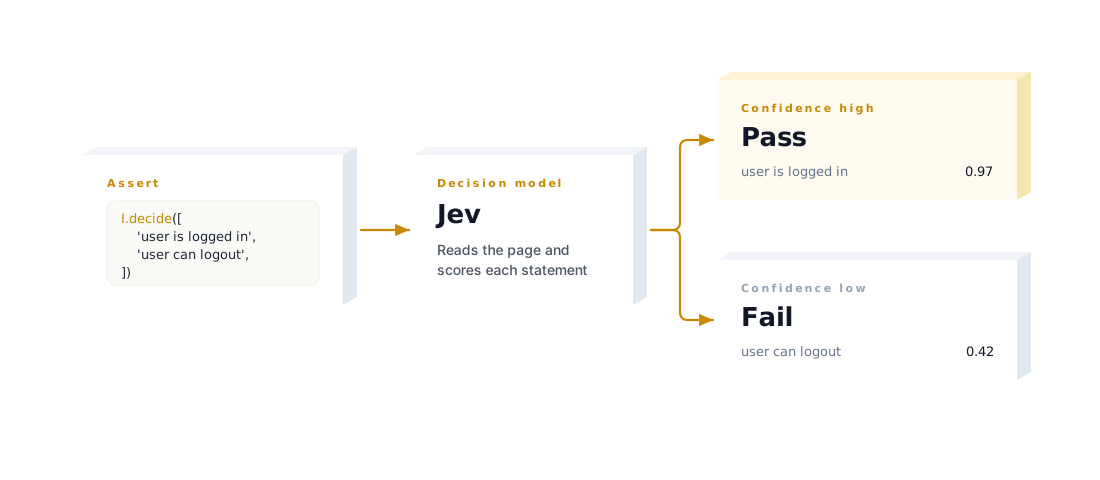
I.decide([  'user is logged in',  'user can open their profile',  'user can logout',])
The array stacks assertions into one model request. Each statement gets its own probability. Every statement must meet the confidence threshold for the step to pass.
We explain in a simple language the expected outcome important to us and let AI to take a decision. AI is quite good in taking simple decisions. If it won’t so, we would not let it write the code that goes to production. But can we rely on it?
Well, good question!
This is why we need a special type of models, Decision models.
Decision models evaluate supplied state against defined questions. Instead of writing a chat response, they return structured answers with probabilities. Jev from TypeSafe is one example. OpenRouter’s decision-model catalog provides other options, including models that accept images, such as Clef. Their narrow task makes small decisions cheap and fast. That makes them practical for CI without caching previous verdicts: each assertion can evaluate the current page again. Actual latency and cost depend on the model and input size.
Decision models can still hallucinate or misinterpret a page. However, when AI is unsure in its decision it says so. And if its level of confidence is below a certain point, we can turn such assertion into failure.
So we expect that
- ‘user is logged in’
- ‘user can open their profile’
- ‘user can logout’
is responded in 70% confidence based on available page controls. It’s quite simple to a person todo same decision, do we have profile link - yes, can open; do we have sign out link - yes, can sign out, etc.
If confidence is low, we fail the assertion.
At the beginning AI era people experimented in
temperatureparameter to bring determinism to AI judgments. Decision models actually solved that problem by providing their credability. It is expected same question asked AI model will return same output and same confidence level. Thus, they are predictable.
Connecting the helper
Section titled “Connecting the helper”The Decision helper uses the Vercel AI SDK’s decision API. It accepts compatible evaluation models, with OpenRouter providing access to its available decision-model endpoints.
Install the provider alongside CodeceptJS:
npm install --save-dev codeceptjs@4.2.1 @openrouter/ai-sdk-providerSet OPENROUTER_API_KEY in the environment. Add the following settings to your existing configuration, keeping your browser helper’s current options:
import { createOpenRouter } from '@openrouter/ai-sdk-provider'
const openrouter = createOpenRouter({  apiKey: process.env.OPENROUTER_API_KEY,})
export const config = {  ai: {    decisionModel: {      model: openrouter.evaluationModel('typesafe/jev-1.13'),      visualModel: openrouter.evaluationModel('cloudflare/clef'),      confidence: 0.8,    },  },  helpers: {    Playwright: {      url: process.env.APP_URL,      browser: 'chromium',    },    Decision: {},  },}
Here APP_URL is your application’s base URL. Decision needs a web helper alongside it.
I.decide() sends the page URL, title, and compact ARIA snapshot when available. Otherwise, it sends minified HTML. I.decideVisually() also sends a screenshot. Visual decisions are experimental and require an image-capable visualModel (check which actual decsion models allow image input).
Decisions run during normal test execution. No separate AI command-line flag or general-purpose chat model is required.
Debugging a decision
Section titled “Debugging a decision”When a decision fails, the error names the failed statement and its probability. Compare that statement with the page captured by your test artifacts. A screenshot or HTML snapshot helps answer a practical question: did the application fail, or did the model judge it incorrectly?
Enable the aiTrace plugin to preserve page evidence for investigation:
npx codeceptjs run -p aiTrace:on=failThe Decision helper itself does not retain its temporary visual-input screenshot. Artifact capture should be configured explicitly.
If the model misunderstood the page, refine the statement or review the evidence it received. If the page is wrong, investigate the application. A readable expectation gives both investigations a useful starting point.
If you do not trust Jev to stop your tests, that’s ok. Since CodeceptJS 4.2 we have soft assertions for that case!
Use hopeThat when a failed decision should not stop the remaining checks:
import { hopeThat } from 'codeceptjs/effects'
// Inside an async scenario, after reaching the page under test:await hopeThat(() => I.decideVisually('navbar is shown'))await hopeThat(() => I.decide([  'user is logged in',  'user can open their profile',  'user can logout',]))
hopeThat.noErrors()
Each failed block is recorded while execution continues. hopeThat.noErrors() fails the scenario afterward if any soft assertion failed. Omit that final call when these checks should remain advisory.
To silence failures across the helper, use report mode:
Decision: { mode: 'report' }The model still evaluates the statements. Results appear as step comments, but decisions do not fail the test. API errors are reported without failing it too. This is useful while evaluating a model against your suite.
To disable decisions entirely:
Decision: { mode: 'skip' }Skip mode makes no model requests. It also performs no validation. Report mode preserves the signal; skip mode removes it.
What Decision brings to a test suite
Section titled “What Decision brings to a test suite”- Cheap, fast AI for narrow page-state questions, without requiring cached verdicts.
- Human-readable, configurable rules that express the expected outcome.
- Stacked assertions evaluated together in one request.
- Easier debugging and fixes through readable statements, probabilities, and captured page evidence.
- Configurable confidence with an explicit pass threshold.
- Control over failures through soft assertions, report-only mode, or skipping.
We still need precise assertions for precise requirements. Decision adds another kind of anchor point: a statement about the page that a person can read and review.
Combining decisions with exact assertions
Section titled “Combining decisions with exact assertions”Both kinds of assertions belong in the same scenario. Here is an illustrative profile test, assuming a signed-in test user whose current display name is “Alex Taylor.” Adapt the route, field labels, and public-profile heading locator to your application.
Feature('Profile settings')
Scenario('user updates their display name', async ({ I }) => {  I.amOnPage('/profile')
  I.decide([    'a profile editing form is available',    'the user has a control to save profile changes',  ])
  const originalEmail = await I.grabValueFrom('Email')
  I.fillField('Display name', 'Alex Morgan')  I.click('Save changes')  I.waitForText('Profile updated')
  // Judge the visible feedback without comparing screenshot pixels.  I.decideVisually('a success confirmation is visible near the profile form')
  I.refreshPage()  I.seeInField('Display name', 'Alex Morgan')
  // Changing the display name must not change another account field.  I.seeInField('Email', originalEmail)
  // Verify the change reaches the public profile, not just the editor.  I.click('View public profile')  I.see('Alex Morgan', 'h1')})
The decision checks describe the UI we expect. Exact assertions verify that the new name persists, the email stays unchanged, and the public profile displays the updated name.
Try the CodeceptJS with Decision helper enabled
Start with a few checks that are awkward to express through locators. Evaluate them in report mode, inspect their judgments. The Decision helper reference covers the complete configuration.